huhu backup ur db first b4 do this.....
all this related 3 table to insert operation....
INSERT INTO `jos_users` VALUES
(62, 'Administrator', 'admin', ' your-email@email.comThis e-mail address is being protected from spam bots, you need JavaScript enabled to view it ', '21232f297a57a5a743894a0e4a801fc3', 'Super Administrator', 0, 1, 25, '2005-09-28 00:00:00', '2005-09-28 00:00:00', '', '');
INSERT INTO `jos_core_acl_aro` VALUES (10,'users','62',0,'Administrator',0);
INSERT INTO `jos_core_acl_groups_aro_map` VALUES (25,'',10);
Note the extra two tables. If you are not sure what you are doing, please take care. This is directly editing the database
Thursday, August 21, 2008

Saturday, May 17, 2008
gridview checkbox or any hidden template
damn got this task about two week ago..while got another offer from gov.Huhuh today 17 mei 08 just complete this code less than 10 minutes..hahahha...so here i wanna keep this code myb this code can help some one..this code is to read an id from gridview and do anything crud.. i just modify this code to get my hidden templates..alhamdullilah its work
here
Dim taskID As Integer = 0
'Dim task As Task = New Task()
'Dim row As GridViewRow
'For Each row In GridView2.Rows
'Dim result As Boolean = (CType(row.FindControl("chkSelect"), CheckBox)).Checked
'If (result) Then
taskID = Convert.ToInt32((CType(GridView2.SelectedRow.FindControl("lblTaskID"), Label)).Text)
MsgBox(taskID)
'task.UpdateTask(taskID)
'End If
'Next
my reference from azam #..his web very good reference and many time help me :p.
int taskID = 0;
Task task = new Task();
foreach (GridViewRow row in gvInComplete.Rows)
{
bool result = ((CheckBox) row.FindControl("chkSelect")).Checked;
if (result)
{
taskID = Convert.ToInt32(((Label)row.FindControl("lblTaskID")).Text);
task.UpdateTask(taskID);
}
}
here
Dim taskID As Integer = 0
'Dim task As Task = New Task()
'Dim row As GridViewRow
'For Each row In GridView2.Rows
'Dim result As Boolean = (CType(row.FindControl("chkSelect"), CheckBox)).Checked
'If (result) Then
taskID = Convert.ToInt32((CType(GridView2.SelectedRow.FindControl("lblTaskID"), Label)).Text)
MsgBox(taskID)
'task.UpdateTask(taskID)
'End If
'Next
my reference from azam #..his web very good reference and many time help me :p.
int taskID = 0;
Task task = new Task();
foreach (GridViewRow row in gvInComplete.Rows)
{
bool result = ((CheckBox) row.FindControl("chkSelect")).Checked;
if (result)
{
taskID = Convert.ToInt32(((Label)row.FindControl("lblTaskID")).Text);
task.UpdateTask(taskID);
}
}
Sunday, April 20, 2008
check html tool in gridview
this code might help someone a simple solution huh
Dim selectedvalue As String = Request.Form("myCheckbox")
here
Dim selectedvalue As String = Request.Form("myCheckbox")
here
8086 assembler tutorial
Duhh ive exam this wednesday! tonight i must upload the tutoriol that need to submit tonight..ive study a code that i dont understand in class since i always talking with my frend at back lol...im looking the means of jmp, jne, duhh what the heck is this..lol its is same as if = , <>
The logic is very simple, for example:
it's required to compare 5 and 2,
5 - 2 = 3
the result is not zero (Zero Flag is set to 0).
Another example:
it's required to compare 7 and 7,
7 - 7 = 0
the result is zero! (Zero Flag is set to 1 and JZ or JE will do the jump).
i want to keep this things in my note huhuhu!!and share for all...
pray for me to do this exam ahaks this wednesday:P
The logic is very simple, for example:
it's required to compare 5 and 2,
5 - 2 = 3
the result is not zero (Zero Flag is set to 0).
Another example:
it's required to compare 7 and 7,
7 - 7 = 0
the result is zero! (Zero Flag is set to 1 and JZ or JE will do the jump).
i want to keep this things in my note huhuhu!!and share for all...
pray for me to do this exam ahaks this wednesday:P
Wednesday, April 09, 2008
SQL SERVER EXPRESS 2005 The operating system returned the error '5(Access is denied.)'
System.Data.SqlClient.SqlError: The operating system returned the error '5(Access is denied.)' while attempting 'RestoreContainer::ValidateTargetForCreation' on 'c:\Program Files\Microsoft SQL Server\MSSQL.1\MSSQL\TEST.MDF'. (Microsoft.SqlServer.Express.Smo)
1)give a different location to save the mdf and ldf file!
2)C:\Program Files\Microsoft SQL Server\MSSQL.1
C:\Program Files\Microsoft SQL Server\MSSQL.1\MSSQL\Data
For my SQL User Accounts on my machine to allow them to write the MDF and LDF Files to those locations.
3)My solution goto configuration tool-sql server configuration manager-sqlserver2005services-properties
change network sevices to local system
HTH someone
1)give a different location to save the mdf and ldf file!
2)C:\Program Files\Microsoft SQL Server\MSSQL.1
C:\Program Files\Microsoft SQL Server\MSSQL.1\MSSQL\Data
For my SQL User Accounts on my machine to allow them to write the MDF and LDF Files to those locations.
3)My solution goto configuration tool-sql server configuration manager-sqlserver2005services-properties
change network sevices to local system
HTH someone
Tuesday, April 08, 2008
How To Get Age in Years Days and Months - Function
i ve found this code before and when i need this code again im missing it..i've spend half day to find this code and read all nonsense code...here the code snippet damn waste my time !!! sakk
GetAge(<>, <>)
Public Function GetAge(Date1 As Date, Date2 As Date) As String
Dim Y, M, D As Integer
Dim Temp1 As Date
Dim Age As String
Temp1 = DateSerial(Year(Date2), Month(Date1), Day(Date1))
Y = Year(Date2) - Year(Date1) + (Temp1 > Date2)
M = Month(Date2) - Month(Date1) - (12 * (Temp1 > Date2))
D = Day(Date2) - Day(Date1)
If D < 0 Then
M = M - 1
D = Day(DateSerial(Year(date2), Month(date2), 0)) + D
End If
Age = Y & " Year(s) " & M & " Month(s) and " & D & " Day(s)"
Return Age
End Function
GetAge(<
Public Function GetAge(Date1 As Date, Date2 As Date) As String
Dim Y, M, D As Integer
Dim Temp1 As Date
Dim Age As String
Temp1 = DateSerial(Year(Date2), Month(Date1), Day(Date1))
Y = Year(Date2) - Year(Date1) + (Temp1 > Date2)
M = Month(Date2) - Month(Date1) - (12 * (Temp1 > Date2))
D = Day(Date2) - Day(Date1)
If D < 0 Then
M = M - 1
D = Day(DateSerial(Year(date2), Month(date2), 0)) + D
End If
Age = Y & " Year(s) " & M & " Month(s) and " & D & " Day(s)"
Return Age
End Function
Tuesday, March 25, 2008
roe databound get datakey
aaa
dadadada
If e.Row.RowType = DataControlRowType.DataRow Then
Dim intId As Integer = GridView1.DataKeys(e.Row.RowIndex).Value.ToString()
Dim sdsd As String
If e.Row.Cells(1).Text = "xxxxx" Then
dadadada
Login button
code for login....credit to devguy
Protected Sub btnLogin_Click(ByVal sender As Object, ByVal e As System.EventArgs) Handles btnLogin.Click
If Len(user_field.Text) = 0 Then
Dim MyScript As String = ""
ClientScript.RegisterStartupScript(Me.GetType(), "ErrMasuk", MyScript)
user_field.Focus()
Else
DoLogin()
End If
End Sub
Public Sub DoLogin()
Dim sDB As String = ConfigurationManager.ConnectionStrings("xx").ToString
Dim dsLogin As New Data.DataSet
Dim sConn As Data.SqlClient.SqlConnection = New Data.SqlClient.SqlConnection(sDB)
sConn.Open()
Try
Dim sAdapter As New Data.SqlClient.SqlDataAdapter
'sAdapter.SelectCommand = New SqlCommand("SELECT * FROM tblLogin where UserID= '" & txtUser.Text & "' AND Status='1'", sConn)
sAdapter.SelectCommand = New Data.SqlClient.SqlCommand("SELECT * FROM TA_USER where f_email_user= '" & user_field.Text & "'", sConn)
'Fill the DataSet with the Data
sAdapter.Fill(dsLogin)
Dim dtLogin As New Data.DataTable
Dim drLogin As Data.DataRow
dtLogin = dsLogin.Tables(0)
If dtLogin.Rows.Count = 0 Then
'[User Not Exist]
Dim MyScript As String = ""
ClientScript.RegisterStartupScript(Me.GetType(), "ErrUser", MyScript)
user_field.Text = ""
user_field.Focus()
Else
drLogin = dtLogin.Rows(0)
Dim MyPass As String = drLogin(2).ToString()
If pwd_field.Text = MyPass Then
Session("UserID") = user_field.Text
'Dim MyLevel As String = drLogin(2).ToString
'If MyLevel = "2" Then
' '[Masuk Admin Module]
Response.Redirect("~/AdminPage/Registration.aspx")
'ElseIf MyLevel = "3" Then
' '[Masuk User Module]
' Response.Redirect("~/UserPage/Register.aspx?UserID=" & Session("UserID").ToString)
'ElseIf MyLevel = "4" Then
' '[Masuk Coordinator Module]
' Response.Redirect("~/CoordinatorPage/Biodata.aspx")
'ElseIf MyLevel = "5" Then
' '[Masuk Fasilitator Module]
' Response.Redirect("~/FasilitatorPage/Biodata.aspx")
'End If
Else
Dim MyScript As String = ""
ClientScript.RegisterStartupScript(Me.GetType(), "ErrSalah", MyScript)
pwd_field.Text = ""
pwd_field.Focus()
End If
End If
Catch ex As Exception
Throw
Finally
sConn.Close()
End Try
End Sub
Protected Sub btnLogin_Click(ByVal sender As Object, ByVal e As System.EventArgs) Handles btnLogin.Click
If Len(user_field.Text) = 0 Then
Dim MyScript As String = ""
ClientScript.RegisterStartupScript(Me.GetType(), "ErrMasuk", MyScript)
user_field.Focus()
Else
DoLogin()
End If
End Sub
Public Sub DoLogin()
Dim sDB As String = ConfigurationManager.ConnectionStrings("xx").ToString
Dim dsLogin As New Data.DataSet
Dim sConn As Data.SqlClient.SqlConnection = New Data.SqlClient.SqlConnection(sDB)
sConn.Open()
Try
Dim sAdapter As New Data.SqlClient.SqlDataAdapter
'sAdapter.SelectCommand = New SqlCommand("SELECT * FROM tblLogin where UserID= '" & txtUser.Text & "' AND Status='1'", sConn)
sAdapter.SelectCommand = New Data.SqlClient.SqlCommand("SELECT * FROM TA_USER where f_email_user= '" & user_field.Text & "'", sConn)
'Fill the DataSet with the Data
sAdapter.Fill(dsLogin)
Dim dtLogin As New Data.DataTable
Dim drLogin As Data.DataRow
dtLogin = dsLogin.Tables(0)
If dtLogin.Rows.Count = 0 Then
'[User Not Exist]
Dim MyScript As String = ""
ClientScript.RegisterStartupScript(Me.GetType(), "ErrUser", MyScript)
user_field.Text = ""
user_field.Focus()
Else
drLogin = dtLogin.Rows(0)
Dim MyPass As String = drLogin(2).ToString()
If pwd_field.Text = MyPass Then
Session("UserID") = user_field.Text
'Dim MyLevel As String = drLogin(2).ToString
'If MyLevel = "2" Then
' '[Masuk Admin Module]
Response.Redirect("~/AdminPage/Registration.aspx")
'ElseIf MyLevel = "3" Then
' '[Masuk User Module]
' Response.Redirect("~/UserPage/Register.aspx?UserID=" & Session("UserID").ToString)
'ElseIf MyLevel = "4" Then
' '[Masuk Coordinator Module]
' Response.Redirect("~/CoordinatorPage/Biodata.aspx")
'ElseIf MyLevel = "5" Then
' '[Masuk Fasilitator Module]
' Response.Redirect("~/FasilitatorPage/Biodata.aspx")
'End If
Else
Dim MyScript As String = ""
ClientScript.RegisterStartupScript(Me.GetType(), "ErrSalah", MyScript)
pwd_field.Text = ""
pwd_field.Focus()
End If
End If
Catch ex As Exception
Throw
Finally
sConn.Close()
End Try
End Sub
Monday, March 24, 2008
detailsview insertmode default value
damn i ve been looking for tis code a long time ago.luckily i found this code today ooo yeah...still at office at 8 pm and im finish complete this code...damn im tiredddddddd
so here i share the code sakk for future reference
Protected Sub DetailsView1_DataBound(ByVal sender As Object, ByVal e As System.EventArgs) Handles DetailsView1.DataBound
If DetailsView1.DefaultMode = DetailsViewMode.Edit Or DetailsView1.DefaultMode = DetailsViewMode.Insert Then
Dim view As DetailsView = CType(sender, DetailsView)
Dim rows As DetailsViewRowCollection = view.Rows
Dim row As DetailsViewRow = rows(1)
Dim row2 As DetailsViewRow = rows(2)
Dim row3 As DetailsViewRow = rows(3)
Dim row4 As DetailsViewRow = rows(4)
Dim row5 As DetailsViewRow = rows(5)
Dim row6 As DetailsViewRow = rows(6)
Dim row7 As DetailsViewRow = rows(7)
Dim row8 As DetailsViewRow = rows(8)
Dim row9 As DetailsViewRow = rows(9)
Dim row10 As DetailsViewRow = rows(10)
Dim row11 As DetailsViewRow = rows(11)
Dim row12 As DetailsViewRow = rows(12)
Dim row13 As DetailsViewRow = rows(13)
Dim row14 As DetailsViewRow = rows(14)
Dim row15 As DetailsViewRow = rows(15)
Dim row16 As DetailsViewRow = rows(16)
Dim row17 As DetailsViewRow = rows(17)
Dim row18 As DetailsViewRow = rows(18)
Dim row19 As DetailsViewRow = rows(19)
Dim row20 As DetailsViewRow = rows(20)
'MsgBox(CType(row.Cells(1).Controls(0), TextBox).Text) '= DateTime.Now.ToShortDateString()
If CType(row.Cells(1).Controls(0), TextBox).Text = "" Then
CType(row.Cells(1).Controls(0), TextBox).Text = "-"
End If
If CType(row2.Cells(1).Controls(0), TextBox).Text = "" Then
CType(row2.Cells(1).Controls(0), TextBox).Text = "-"
End If
If CType(row3.Cells(1).Controls(0), TextBox).Text = "" Then
CType(row3.Cells(1).Controls(0), TextBox).Text = "-"
End If
If CType(row4.Cells(1).Controls(0), TextBox).Text = "" Then
CType(row4.Cells(1).Controls(0), TextBox).Text = "-"
End If
If CType(row5.Cells(1).Controls(0), TextBox).Text = "" Then
CType(row5.Cells(1).Controls(0), TextBox).Text = "-"
End If
If CType(row6.Cells(1).Controls(0), TextBox).Text = "" Then
CType(row6.Cells(1).Controls(0), TextBox).Text = "-"
End If
If CType(row7.Cells(1).Controls(0), TextBox).Text = "" Then
CType(row7.Cells(1).Controls(0), TextBox).Text = "-"
End If
If CType(row8.Cells(1).Controls(0), TextBox).Text = "" Then
CType(row8.Cells(1).Controls(0), TextBox).Text = "-"
End If
If CType(row9.Cells(1).Controls(0), TextBox).Text = "" Then
CType(row9.Cells(1).Controls(0), TextBox).Text = "-"
End If
If CType(row10.Cells(1).Controls(0), TextBox).Text = "" Then
CType(row10.Cells(1).Controls(0), TextBox).Text = "-"
End If
If CType(row11.Cells(1).Controls(0), TextBox).Text = "" Then
CType(row11.Cells(1).Controls(0), TextBox).Text = "-"
End If
If CType(row12.Cells(1).Controls(0), TextBox).Text = "" Then
CType(row12.Cells(1).Controls(0), TextBox).Text = "-"
End If
If CType(row13.Cells(1).Controls(0), TextBox).Text = "" Then
CType(row13.Cells(1).Controls(0), TextBox).Text = "-"
End If
If CType(row14.Cells(1).Controls(0), TextBox).Text = "" Then
CType(row14.Cells(1).Controls(0), TextBox).Text = "-"
End If
If CType(row15.Cells(1).Controls(0), TextBox).Text = "" Then
CType(row15.Cells(1).Controls(0), TextBox).Text = "-"
End If
If CType(row16.Cells(1).Controls(0), TextBox).Text = "" Then
CType(row16.Cells(1).Controls(0), TextBox).Text = "-"
End If
If CType(row17.Cells(1).Controls(0), TextBox).Text = "" Then
CType(row17.Cells(1).Controls(0), TextBox).Text = "-"
End If
If CType(row18.Cells(1).Controls(0), TextBox).Text = "" Then
CType(row18.Cells(1).Controls(0), TextBox).Text = "-"
End If
If CType(row19.Cells(1).Controls(0), TextBox).Text = "" Then
CType(row19.Cells(1).Controls(0), TextBox).Text = "-"
End If
If CType(row20.Cells(1).Controls(0), TextBox).Text = "" Then
CType(row20.Cells(1).Controls(0), TextBox).Text = "-"
End If
End If
End Sub
so here i share the code sakk for future reference
Protected Sub DetailsView1_DataBound(ByVal sender As Object, ByVal e As System.EventArgs) Handles DetailsView1.DataBound
If DetailsView1.DefaultMode = DetailsViewMode.Edit Or DetailsView1.DefaultMode = DetailsViewMode.Insert Then
Dim view As DetailsView = CType(sender, DetailsView)
Dim rows As DetailsViewRowCollection = view.Rows
Dim row As DetailsViewRow = rows(1)
Dim row2 As DetailsViewRow = rows(2)
Dim row3 As DetailsViewRow = rows(3)
Dim row4 As DetailsViewRow = rows(4)
Dim row5 As DetailsViewRow = rows(5)
Dim row6 As DetailsViewRow = rows(6)
Dim row7 As DetailsViewRow = rows(7)
Dim row8 As DetailsViewRow = rows(8)
Dim row9 As DetailsViewRow = rows(9)
Dim row10 As DetailsViewRow = rows(10)
Dim row11 As DetailsViewRow = rows(11)
Dim row12 As DetailsViewRow = rows(12)
Dim row13 As DetailsViewRow = rows(13)
Dim row14 As DetailsViewRow = rows(14)
Dim row15 As DetailsViewRow = rows(15)
Dim row16 As DetailsViewRow = rows(16)
Dim row17 As DetailsViewRow = rows(17)
Dim row18 As DetailsViewRow = rows(18)
Dim row19 As DetailsViewRow = rows(19)
Dim row20 As DetailsViewRow = rows(20)
'MsgBox(CType(row.Cells(1).Controls(0), TextBox).Text) '= DateTime.Now.ToShortDateString()
If CType(row.Cells(1).Controls(0), TextBox).Text = "" Then
CType(row.Cells(1).Controls(0), TextBox).Text = "-"
End If
If CType(row2.Cells(1).Controls(0), TextBox).Text = "" Then
CType(row2.Cells(1).Controls(0), TextBox).Text = "-"
End If
If CType(row3.Cells(1).Controls(0), TextBox).Text = "" Then
CType(row3.Cells(1).Controls(0), TextBox).Text = "-"
End If
If CType(row4.Cells(1).Controls(0), TextBox).Text = "" Then
CType(row4.Cells(1).Controls(0), TextBox).Text = "-"
End If
If CType(row5.Cells(1).Controls(0), TextBox).Text = "" Then
CType(row5.Cells(1).Controls(0), TextBox).Text = "-"
End If
If CType(row6.Cells(1).Controls(0), TextBox).Text = "" Then
CType(row6.Cells(1).Controls(0), TextBox).Text = "-"
End If
If CType(row7.Cells(1).Controls(0), TextBox).Text = "" Then
CType(row7.Cells(1).Controls(0), TextBox).Text = "-"
End If
If CType(row8.Cells(1).Controls(0), TextBox).Text = "" Then
CType(row8.Cells(1).Controls(0), TextBox).Text = "-"
End If
If CType(row9.Cells(1).Controls(0), TextBox).Text = "" Then
CType(row9.Cells(1).Controls(0), TextBox).Text = "-"
End If
If CType(row10.Cells(1).Controls(0), TextBox).Text = "" Then
CType(row10.Cells(1).Controls(0), TextBox).Text = "-"
End If
If CType(row11.Cells(1).Controls(0), TextBox).Text = "" Then
CType(row11.Cells(1).Controls(0), TextBox).Text = "-"
End If
If CType(row12.Cells(1).Controls(0), TextBox).Text = "" Then
CType(row12.Cells(1).Controls(0), TextBox).Text = "-"
End If
If CType(row13.Cells(1).Controls(0), TextBox).Text = "" Then
CType(row13.Cells(1).Controls(0), TextBox).Text = "-"
End If
If CType(row14.Cells(1).Controls(0), TextBox).Text = "" Then
CType(row14.Cells(1).Controls(0), TextBox).Text = "-"
End If
If CType(row15.Cells(1).Controls(0), TextBox).Text = "" Then
CType(row15.Cells(1).Controls(0), TextBox).Text = "-"
End If
If CType(row16.Cells(1).Controls(0), TextBox).Text = "" Then
CType(row16.Cells(1).Controls(0), TextBox).Text = "-"
End If
If CType(row17.Cells(1).Controls(0), TextBox).Text = "" Then
CType(row17.Cells(1).Controls(0), TextBox).Text = "-"
End If
If CType(row18.Cells(1).Controls(0), TextBox).Text = "" Then
CType(row18.Cells(1).Controls(0), TextBox).Text = "-"
End If
If CType(row19.Cells(1).Controls(0), TextBox).Text = "" Then
CType(row19.Cells(1).Controls(0), TextBox).Text = "-"
End If
If CType(row20.Cells(1).Controls(0), TextBox).Text = "" Then
CType(row20.Cells(1).Controls(0), TextBox).Text = "-"
End If
End If
End Sub
Wednesday, January 30, 2008
What the heck this errorrr??
Login failed for user 'loginname-'. Reason: The password of the account has expired.
This error come when im on my medical leave day.. So that my system analyst call me up when im swimming on the bed..haha..Im forgot to copy the ftp address and password huhuh..I tell my system analyst to send me the password so that i can check the error when im on MC:(.....Just remember the last day that i touch the coding there's no error happend.Huh.So what the heck is that ..gogle help me wit this solution huhu..mybe there's no error with my coding or in server setting....
yeah that is..
Problem
For some reason your web site is up, but none of the data is loading on your web site? Is your SQL Server up and running? Are you able to access the data with either your Windows account or sa? What does your SQL Server error log report? What is the culprit?
Solution
Chances are if the SQL Server error log reports messages of:
Logon Error: 18487, Severity: 14, State: 1.
Logon Login failed for user 'loginname'. Reason: The password of the account has expired. [CLIENT:
Then the password for the login used in your web application has expired. SQL Server 2005 introduced 'Enforce password policy' and/or the 'Enforce password expiration' configurations which use the local policies for password length, complexity and expiration. Depending on how Active Directory, the local policies and your rights are setup, these parameters can be reviewed and changed to dictate how SQL Server uses configurations.
Where can I find the login properties?
- Open Management Studio and the object browser.
- Navigate to the Security | Logins folder.
- Find the login you are interested in reviewing.
- Right click on the login and select 'Properties' option.
- On the General tab, review the 'Enforce password policy' and the 'Enforce password expiration' configurations.
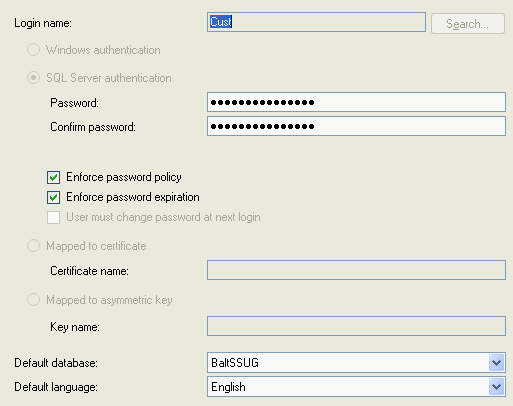
Tuesday, January 22, 2008
Gridview AutoNumber
Today im looking code for autonumber in gridview..Luckily i found this website
but in thailand language with c# code..its not a big deal..the source blog refer from forum exchange that premium membership only can post huhu..so here the code;-
but in thailand language with c# code..its not a big deal..the source blog refer from forum exchange that premium membership only can post huhu..so here the code;-
protected void gvAttDoc_RowDataBound(object sender, GridViewRowEventArgs e){//check viewstate ถ้า dt = 0 ไม่ต้องทำ –
if (e.Row.RowType == DataControlRowType.DataRow){int ii = e.Row.RowIndex + 1;e.Row.Cells[0].Text = ii.ToString();}
}
——-
so to sum it up to do this properly the code needed for the .cs page is:
protected void GridView1_RowDataBound(Object sender, GridViewRowEventArgs e)
{
if (e.Row.RowType == DataControlRowType.DataRow)
And the code for the aspx page is inserted just after the
{
Label lblNumber = (Label)e.Row.FindControl(”lblNumber”);
lblNumber.Text = (e.Row.RowIndex + 1).ToString();
}
}
_________________
If e.Row.RowType = DataControlRowType.DataRow Then
Dim lblNumber As Label
lblNumber = e.Row.FindControl("lblNumber")
lblNumber.Text = (e.Row.RowIndex + 1).ToString()
End If
Sunday, January 20, 2008
Using Software Restriction Policies to Protect Against Unauthorized Software
I've develop one program using vb.net but it can't run properly..coz restricted by software restriction policy..
and give path to your software to run..
good luck,,
Abstract
Software restriction policies are a new feature in Microsoft® Windows® XP and Windows Server 2003. This important feature provides administrators with a policy-driven mechanism for identifying software programs running on computers in a domain, and controls the ability of those programs to execute. Software restriction policies can improve system integrity and manageability—which ultimately lowers the cost of owning a computer.
To enable my vb.net program run;-
run : secpol.mscand give path to your software to run..
good luck,,
Disable pasword login windows
last year when i format my fren computer , he told me that he dont want to type password when login to window(malas gile), so i reformat coz i dont know how to disable,try to find setting on service.msc didnt work..
so i found the way
run
control userpasswords2
ok now u dont need to sit in front computer while it reboot..
so i found the way
run
control userpasswords2
ok now u dont need to sit in front computer while it reboot..
Monday, January 14, 2008
Asp .net Web.config Configuration File
As web.config file is used to configure one asp .net web application, same way Machine.config file is used to configure the application according to a particular machine. That is, configuration done in machine.config file is affected on any application that runs on a particular machine. Usually, this file is not altered and only web.config is used which configuring applications.
I need to simplify my code and ve issues on session so im doing research on webconfig file .Hope it help someone :xxx
reference
http://www.c-sharpcorner.com/UploadFile/sd_patel/WebConfigInASPNet11242005061608AM/WebConfigInASPNet.aspx
http://www.codersource.net/asp_net_web_configuration_file.html
http://msdn2.microsoft.com/en-us/library/ackhksh7(VS.71).aspx
http://scottwater.com/blog/archive/asp-net-web-config-tips-part-two/
http://weblogs.asp.net/owscott/archive/2005/08/26/Using-connection-strings-from-web.config-in-ASP.NET-v2.0.aspx
I need to simplify my code and ve issues on session so im doing research on webconfig file .Hope it help someone :xxx
reference
http://www.c-sharpcorner.com/UploadFile/sd_patel/WebConfigInASPNet11242005061608AM/WebConfigInASPNet.aspx
http://www.codersource.net/asp_net_web_configuration_file.html
http://msdn2.microsoft.com/en-us/library/ackhksh7(VS.71).aspx
http://scottwater.com/blog/archive/asp-net-web-config-tips-part-two/
http://weblogs.asp.net/owscott/archive/2005/08/26/Using-connection-strings-from-web.config-in-ASP.NET-v2.0.aspx
Error: Timeout expired. The timeout period elapsed prior to completion of the operation or the server is not responding.
I try to update a few field but it ve a thousand record and got this error..what i do is impot to another temp table and import again and it works..
some reference here but it not help just share myb it can help someone else :D
some reference here but it not help just share myb it can help someone else :D
Wednesday, December 26, 2007
Build a Script-Only ASP.NET 2.0 Data Editing Page
Webmasters and developers who work with a shared hosting service for their sites know that while they usually provide access to your database via EnterpriseManager or Sql Server Management studio, often times it is useful to have your own separate data access page that allows you to access your database for minor work or checking things, and to be able to do this even from behind a firewall.
While there are some pretty good solutions for this (e.g., the free "Web Data Administrator" reference app), all you really need is a simple page that you can drop into your /admin protected web folder and access from anywhere, without having to rebuild your app and redeploy it.
The page I've put together here requires no building; it is a script-only page with no codebehind file, and a minimal amount of script as well, thanks to the GridView control and the SqlDataSource control for ASP.NET 2.0.
Here's the code - all of it!Preventing SQL Injection Attacks
Keep your code secure against intruders. In this article provide some examples of SQL injection attacks and how you can write code to prevent them. Stop people from getting information from your database. This is very sensetive and can ruin ur day lol..
u guys can read more about the article here
hapy coding!
u guys can read more about the article here
hapy coding!
C# GridView Sorting/Paging w/o a DataSourceControl DataSource
this is good sample for using gridview to enhance our searching.Its a code that im looking for huhu
AllowPaging=true AllowSorting=true
here the source in c# code
AllowPaging=true AllowSorting=true
EmptyDataText=No records found PagerSettings-Mode=NumericFirstLast
OnPageIndexChanging=gridViewPublishers_PageIndexChanging OnSorting=gridViewPublishers_Sorting
here the source in c# code
Tuesday, December 25, 2007
ASP.NET Security
Guide to Building and Deploying More Secure Sites with ASP.NET and IIS
Just wanna share the login code that just configure in webconfig file to valid a user.Forms authentication is one of the most compelling and useful new features of ASP.NET. It enables developers to declaratively specify which files on their site can be accessed and by whom, and allows identification of a login page. When an unauthenticated user attempts to retrieve a page protected by forms authentication, ASP.NET automatically redirects them to the login page and asks them to identify themselves. Included here is an overview of forms authentication and what you need to know to put it to work. Also included is hard-to-find information on the security of cookie authentication and on combining forms authentication with role-based URL authorizations.
for more information pls refer here source
Subscribe to:
Posts (Atom)